
Secure Remote Access: Enterprise ZTNA Implementation Guide
In today’s modern business environment, secure remote access is no longer a luxury. It is a core operational requirement. Distributed engineering teams, hybrid employees, and third party vendors all require seamless connection to internal applications, production infrastructure, and edge devices from outside traditional corporate walls.
However, traditional remote access methods, specifically legacy Virtual Private Networks (VPNs), often grant overly broad network level access. Once a user authenticates to a VPN, they frequently gain lateral visibility across the entire private network, exponentially increasing your attack surface and blast radius if an account is compromised.
To protect business critical systems without introducing friction, organizations must shift toward an identity driven, Zero Trust Network Access (ZTNA) model. This comprehensive guide covers how to transition away from broad network connectivity, compare modern remote access solutions, and deploy a scalable, high security remote access architecture.
What is Secure Remote Access? (Access vs. Remote Control)
Secure remote access is the practice of reaching private applications, internal systems, or corporate devices from an external location using rigorous security controls. This architectural framework encompasses several daily business operations, including:
- Employees accessing internal corporate web applications.
- Engineers connecting directly to private cloud infrastructure.
- External vendors managing specific enterprise portals.
Remote Access vs. Secure Remote Control
While frequently used interchangeably, secure remote control is a highly sensitive subset of remote access.
- Secure Remote Access: Typically permits a user to interface with a specific application or service, such as viewing an internal analytics dashboard.
- Secure Remote Control: Involves privileged, interactive management, such as direct server administration, device troubleshooting, or infrastructure configuration adjustments. Because remote control allows users to modify backend behavior or operate highly sensitive resources, it demands significantly stricter authentication workflows, tighter access windows, and granular auditing.
Ultimately, an enterprise grade remote access model must definitively answer three foundational questions for every connection attempt:
- Who is the user requesting entry?
- What exact resource or application are they attempting to reach?
- Should this specific transaction be permitted based on identity, context, and real time policy?
The Risk of Legacy Architecture: Why Modernizing Matters
When remote infrastructure scales organically without a centralized strategy, significant vulnerability gaps rapidly emerge. It is common for disparate operations teams to independently open firewall ports, provision standalone VPN tunnels, or distribute shared accounts to external contractors.
This unmanaged growth results in severe corporate vulnerabilities:
- Broad Network Visibility and Lateral Movement: Placing remote users directly onto the network segment allows compromised endpoints to scan and exploit adjacent corporate assets.
- Public Internet Exposure: Leaving internal admin dashboards, staging sites, and IoT interfaces exposed to the public web makes them prime targets for automated malicious scanning.
- Weak Authentication and Audit Trails: Relying on shared accounts or single factor authentication leaves security teams with opaque logs, making it virtually impossible to accurately verify user identity during an investigation.
Modern secure remote access mitigates these vectors by placing a unified layer of strong identity verification, contextual policy enforcement, and end to end encryption in front of your private infrastructure.
5 Core Pillars of a Zero Trust Remote Access Strategy
To build a resilient remote access framework, your architecture must incorporate these five core security requirements:
1. Identity Based Access Control
Every single request must map to a known, verified individual or service identity. Organizations should integrate their access architecture directly with a centralized, trusted Identity Provider (IdP). Multi Factor Authentication (MFA) must be enforced across all external connections, privileged accounts, and sensitive environments. Centralizing identity dramatically simplifies lifecycle management: when an employee changes roles or departs the organization, their permissions are instantly revoked from a single directory.
2. Strict Enforceability of Least Privilege
Users should only be granted visibility into the precise systems required to execute their immediate job duties. A customer support representative may require access to a management dashboard, whereas a DevOps engineer requires entry to a specific backend server. Restricting connectivity to the resource level eliminates broad, unnecessary network privileges.
3. Resource Level Micro Segmentation Policies
Traditional security models evaluate access based on network topology, such as whether an IP address belongs to a specific subnet. Modern ZTNA shifts this evaluation directly to the specific application, database, or device interface. Micro segmenting access at the resource level separates routine business applications from high risk administrative frameworks, keeping your high value infrastructure hidden from view.
4. End to End Encrypted Connectivity
All remote data traffic must be thoroughly encrypted in transit. This establishes a baseline layer of protection against eavesdropping as data transits public networks between the end user device and the destination infrastructure. However, encryption is merely a baseline tool; it must operate in tandem with strong identity checks and comprehensive session logging.
5. Centralized Logging, Monitoring, and Alerting
Security and compliance teams require real time visibility to identify who accessed what asset, precisely when the transaction occurred, and the originating context. Beyond generating comprehensive audit trails for regulatory compliance, real time monitoring must track infrastructure health. If a remote corporate edge site or secure tunnel goes offline, operations teams must be notified instantly to remediate the outage.
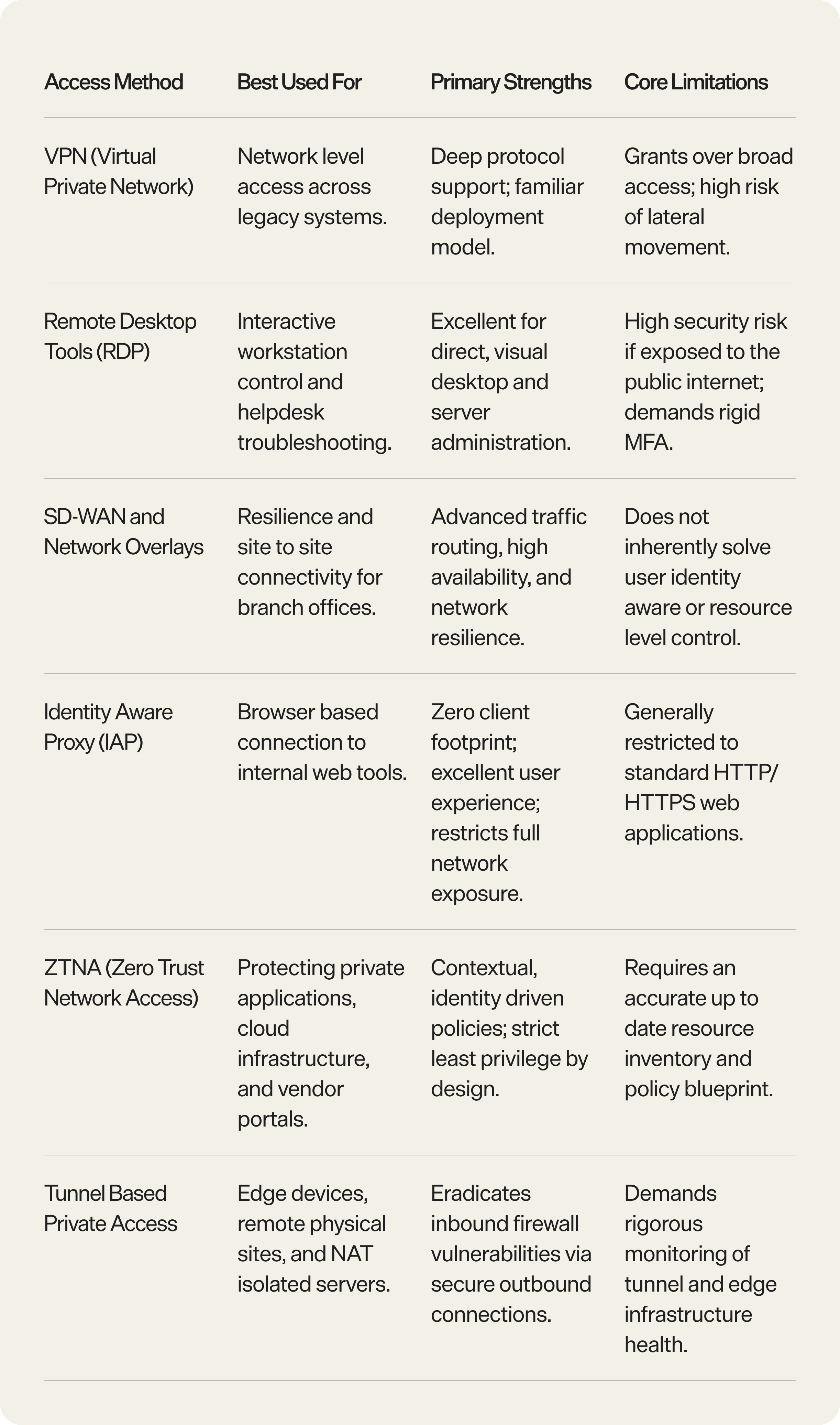
Comparing Remote Access Solutions
Selecting the ideal remote access tool depends heavily on the specific target asset, the user profile, and the underlying operational model. Modern enterprises rarely rely on a single utility; instead, they unify identity and policy control while leveraging tailored access methods for distinct use cases.
Step by Step Secure Remote Access Implementation Framework
Transitioning your enterprise to an identity aware, resource level access architecture should be executed in deliberate, structured phases.
Phase 1: Build a Definitive Remote Access Inventory
You cannot secure what you cannot see. Compile a thorough matrix of every resource requiring external accessibility. For every asset, document:
- Resource name, technical owner, and primary business function.
- Physical or cloud location, along with its current internet exposure.
- Authorized user groups and legacy authentication types.
- Current logging status and compliance sensitivity.
Phase 2: Categorize Corporate Assets by Risk
Not all infrastructure demands identical security overhead. Segment your inventory into three explicit risk buckets to prioritize your deployment resources:
- Low Risk: Read only internally facing metrics tools or general documentation dashboards.
- Medium Risk: Mainline corporate applications, internal development portals, or IT helpdesk tools.
- High Risk: Production databases, customer facing deployments, cloud infrastructure consoles, and SSH endpoints. High risk assets require short lived access windows and mandatory multi factor authentication.
Phase 3: Define Granular Role Based Profiles
Construct unambiguous roles that map to real world operational responsibilities. Avoid over broad, generic permissions. Standard role classifications typically include Employee, Engineering, Operations, Third Party Vendor, and Read Only Support. This role based structure simplifies scale as your workforce expands.
Phase 4: Establish Clear, Auditable Access Policies
Translate operational requirements into clear policies before coding them into your platform. For every resource policy, clearly define the authorized groups, required authentication triggers, access lifecycles (ongoing vs. time bound), and audit review intervals.
Operational Tip: To ensure policy configuration consistency and prevent configuration drift, adopt a GitOps workflow. Managing your security policies via centralized CI/CD pipelines ensures every modification is peer reviewed, tracked, and automatically deployed.
Phase 5: Minimize Public Ingress and Internet Exposure
Conceal your private systems from the open internet. Admin consoles, production databases, and internal dashboards should never possess a public IP address or an open inbound firewall port. Instead, leverage secure outbound tunnels or identity aware proxies to establish connections. This technique keeps your critical origin servers hidden, completely neutralizing automated exploits and external network scanning.
Phase 6: Execute a Staged Rollout
Avoid a single switch flip migration. Begin by selecting a single, low risk, highly visible use case, such as an internal web app or a single engineering resource group. Extensively test the authentication latency, policy workflows, log generation, and end user friction. Once optimized, systematically scale the deployment across the remaining corporate environment.
Operational Best Practices for Security Leaders
Maintaining a secure remote architecture requires continuous lifecycle management. Implement these operational practices to maintain a robust security posture:
- Mitigate Privilege Creep with Mandatory Access Reviews: Access authorizations must not be indefinite. Audit user permissions on a structured schedule. Standard access paths should undergo quarterly evaluation, while privileged infrastructure and external vendor permissions should be verified monthly or immediately following internal re-organizations.
- Proactively Monitor for Anomalous Access Patterns: Configure real time alerts within your centralized SIEM to flag suspicious behavior. Key indicators include authentication requests originating from unexpected geographical locations, repeated failed logins, off hours administrative access, active permissions tied to stale or inactive accounts, and policy modifications.
- Eliminate Shared Profiles and Accounts: Shared credentials erode accountability and weaken forensic utility. Enforce individual identities for all personnel, including external contractors, to ensure every entry in your system logs accurately maps back to a single verifiable user.
- Enforce Device Posture Checks: Identity verification alone can fall short if an approved user logs in from an infected personal device. Integrate device approval and posture controls to verify that connecting endpoints meet core company compliance baselines, such as active OS firewalls and updated patch levels, before granting entry.
Technical Spotlight: Transitioning Your Enterprise with Pangolin
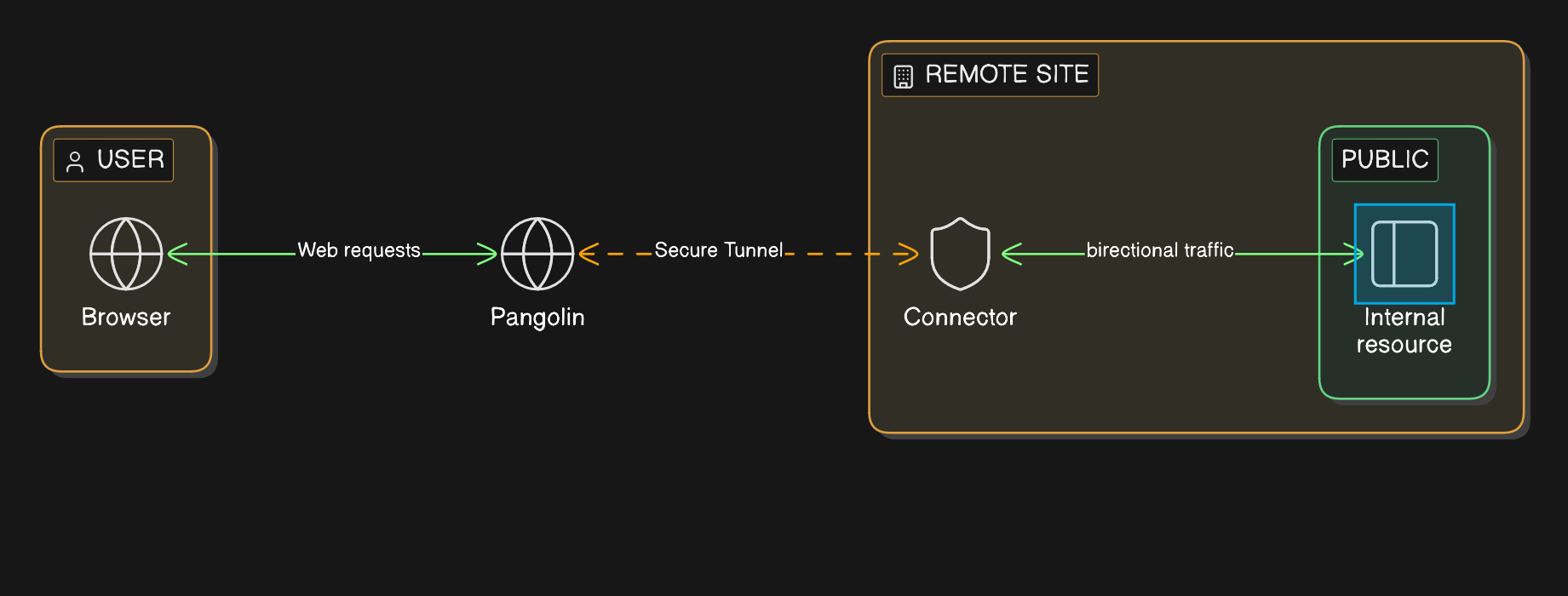
Organizations looking to implement a modern ZTNA framework can leverage Pangolin, an open source, WireGuard powered Zero Trust Access Platform. Pangolin enables teams to deliver high performance, secure remote access to internal resources without exposing assets directly to the public web.
Key Capabilities of the Pangolin Platform
- Resource Level Granularity: Pangolin helps shift companies away from broad network access by organizing architecture into explicit Sites, Resources, Roles, and Policies.
- Clientless Browser Access: Included in the Pangolin 1.18 release, the platform supports secure HTTPS private resources. This permits browser based access to internal HTTP applications without exposing them publicly or requiring complex end user client software.
- Comprehensive Endpoint Protection: Introduced in version 1.15.0, Pangolin provides advanced device approvals and posture validation controls to guarantee connections only originate from verified corporate hardware.
- GitOps Native Configuration: Teams can easily manage their Pangolin Blueprints directly via corporate CI/CD repositories, bringing automation, clear version tracking, and auditability to infrastructure security configurations.
- Automated Edge Provisioning: For distributed IoT networks and large scale branch deployments, Pangolin offers templated provisioning models to prevent manual configuration errors and eliminate configuration drift.
Checklist: Evaluating Your Current Remote Access Security
Use this quick diagnostic checklist to audit your existing remote access framework and plan your optimization roadmap:
- [ ] Inventory: Do you maintain a unified, current ledger of every server, application, and device interface requiring external access?
- [ ] Ownership: Does every single inventoried resource possess a designated technical and business owner?
- [ ] Identity Integration: Is every incoming access request strictly tied to an individual directory user instead of a shared login?
- [ ] MFA Enforcement: Is multi factor authentication enforced for all external connections and privileged infrastructure actions?
- [ ] Least Privilege: Are users limited strictly to the applications required for their job description, or do they possess broad network visibility?
- [ ] Public Concealment: Are your critical administrative portals and staging environments fully hidden from public internet scanning?
- [ ] Comprehensive Auditing: Can your security operations team clearly track who accessed what asset, from where, and under which specific policy?
- [ ] Centralized Offboarding: When an employee or third party contractor departs, is their access instantly and completely revoked via a centralized identity provider?
Further reading
What is an Identity-Aware Proxy (IAP)?
GitOps Workflow for Pangolin Blueprints
Pangolin Clients Documentation
Templated Provisioning and Rollouts for the Edge
Frequently Asked Questions (FAQs)
Is a traditional VPN sufficient for modern remote access security?
While VPNs provide reliable, encrypted transit across legacy setups, they fall short for modern distributed teams. The primary issue is their broad network level trust model: once authenticated, users are placed onto the corporate network segment, allowing lateral movement to adjacent systems. Modern architectures use resource level tools like ZTNA to restrict users to specific applications, keeping the rest of the network isolated.
What is the most secure strategy for managing third party vendor access?
The most secure method is to avoid shared company accounts completely. Assign each vendor an individual identity within your system, mandate multi factor authentication (MFA), limit their permissions to the exact target application required for their contract, and enforce strict, time bound access windows. Ensure all vendor session actions are thoroughly logged and reviewed on a monthly cycle.
How does Zero Trust Network Access (ZTNA) protect against automated cyber attacks?
Zero Trust architecture functions by removing implicit trust based on network location. A user or endpoint is never considered trusted simply because they connect from a corporate VPN or a known IP range. Instead, every transaction undergoes contextual validation against user identity, active device posture, and resource policies. Furthermore, ZTNA keeps origin infrastructure entirely private, eliminating open public inbound ports and protecting assets from internet scanning.
What specific logs are required for remote access compliance auditing?
To meet standard enterprise compliance and forensic standards, access logs must capture the specific identity of the user initiating the connection, precise login and logout timestamps, the target resource accessed, whether the request was approved or denied, the originating device context, the IP address, and the specific security policy applied. Monitoring should also track the underlying infrastructure and tunnel health.
Pangolin is an open-source infrastructure company that provides secure, zero trust remote access for teams of all sizes. Built to simplify user workflows and protect critical systems, Pangolin helps companies and individuals connect to their networks, applications, and devices safely without relying on traditional VPNs. With a focus on device security, usability, and transparency, Pangolin empowers organizations to manage access efficiently while keeping their infrastructure secure.
Keep reading
 GitOps Workflow for Pangolin Blueprints: Continuous Access Control via CI/CD
Stop policy drift and manual dashboard overhead. This guide details a GitOps workflow for Pangolin Blueprints, using declarative YAML state in Git and automated application via GitHub Actions. By treating Git as the source of truth for access intent, teams gain crucial operational benefits like version history, pull request review, and the ability to manage resources at scale
Guides How to Geo-block with Pangolin
Learn how to use the rules engine to enable geo-blocking for your resources.
Guides Pangolin Single Sign-On with Google, Microsoft, and OAuth2/OIDC Identity Providers
You can now log in to Pangolin with your existing identity provider - including Google, Microsoft, and any OAuth2/OIDC compatible IdP.
Guides